VRBO Host Cancellation Policy: How To Stay Compliant
Learn how to stay compliant with the Vrbo Host Cancellation Policy in 2026, avoid penalties for slow responses, and protect your vacation rental income with clear communication and best practices.
28 novembre 2025


Slow replies on Vrbo used to “just” be bad service.
As of October 1, 2025, the VRBO Host-Initiated Cancellation Policy turned slow communication into something far more serious:
A potential 100% penalty on the booking amount — even if the guest’s reservation was otherwise solid.
This update means hosts must understand how the response time rules, communication expectations, and check-in procedures all tie directly into Vrbo’s cancellation policy and ranking metrics.
This article explains:
The new rules and the risks for every property owner, manager, or vacation rental professional
What Vrbo expects at the time of booking, before and right at check-in, and during stay
How the rules impact vacation rental, short-term rental, and VRBO listing performance
What both hosts and potential guests think about the change
Best practices to avoid cancellations, protect rental income, and maintain guest trust and platform reputation
Here’s how the new Vrbo Host-Initiated Cancellation Policy ties directly into the Host Communications Policy – and why answering check-in and access questions fast is now both good hospitality and legal compliance.
The New Risk: Slow Responses Can Trigger 100% Penalties
Vrbo’s October 2025 update introduced fee tiers for partner-initiated cancellations. Under the following circumstances, a cancellation caused by access issues, missing check-in instructions, or host unresponsiveness can result in Vrbo keeping up to 100% of the booking amount.
In 2025 Vrbo rolled out two big pieces of policy:
Host Communications Policy (effective Jan 1, 2025) – sets strict deadlines for:
Sending check-in instructions and access info
Answering “critical stay information” questions (access, safety, key amenities, etc.
Host-Initiated Cancellation Policy (updated Oct 1, 2025) – adds tiered financial penalties when a reservation is cancelled or when a host is “responsible” for a cancellation, including non-responsiveness and denied entry.
The core change in October:
If a guest can’t access the property and Vrbo can’t reach you in time, it’s now treated as a host-initiated cancellation with up to 100% of the reservation value charged as a fee.
This includes situations where:
A guest arrives within the expected hours of arrival and cannot enter
The host fails to send necessary information (codes, directions, house rules)
Vrbo cannot reach the host by phone call or message
Issues arise that are within the host’s control and are not solved in time
If the host is unreachable, Vrbo can:
Cancel the booking
Issue a full refund to the guest
Apply payout deductions equal to 10–100% of the reservation
Potentially impose a temporary suspension or reduced visibility in search results on the platform
Fee tiers (US, USD listings):
10% of reservation value – cancelled >30 days before check-in
25% – cancelled 2–30 days before check-in
50% – cancelled within 48 hours of check-in or after, including non-responsiveness that violates the Communications Policy
100% – starting Oct 1, 2025, if:
The reservation is cancelled at check-in time or after.
The stay is “passively not honoured” due to non-responsiveness under the Host Communications Policy, or
The guest is denied entry without justifiable cause.
On top of the fee:
You don’t receive the payout for that reservation.
If you’d already been paid, future payouts are reduced until Vrbo recovers the amount.
Vrbo can also impose a 7-day listing suspension, blocked calendars, and harm to your Premier Host eligibility and ranking.
Once Vrbo processes a cancellation request, the system reviews the Vrbo dashboard, message history, and reservation manager logs to determine responsibility.
This is why Vrbo’s response time rules are now effectively a host survival guide.
Communication = Compliance: The Timeframes You Must Hit
Check-in & access info
Under the Host Communications Policy:
At least 72 hours before scheduled check-in
You must tell guests when and how they’ll receive full access instructions.e.g. “You’ll receive your door code via the Vrbo app at 9 AM on the day of arrival.”
Before check-in time
You must provide the full access instructions (door code, key pick-up details, etc.).
If a guest tells Vrbo within 72 hours of check-in that they don’t have check-in/access info, Vrbo can:
Investigate
Try to reach you
If they can’t confirm you complied and they can’t reach you in time, cancel the booking, refund the guest, and apply the Host-Initiated Cancellation Policy.
Response times for “critical stay information”
“Critical stay information” covers things a guest needs to safely complete the stay: access, health and safety, outages, location, accessibility, key amenities etc.
You must respond to these questions within:
5+ days before stay – within 24 hours
1-4 days before stay – within 12 hours
Check-in day & during stay (8:00–21:00 property time zone) – within 1 hour. For out-of-hours queries, hosts must respond by 9 am the following day.
And not just with “Got it”:
You must resolve the specific issue or tell them when it will be resolved.
An automatic reply does not count.
If Vrbo becomes aware that you didn’t respond in time to critical questions and can’t fix it with you, they may:
Cancel the booking,
Refund the guest, and
Trigger cancellation fees + ranking hits under the Host-Initiated Cancellation Policy.
In other words:
Failing to answer critical questions on time is now treated like cancelling the guest.
What This Means in Practice for Vacation Rentals Using VRBO
For individual hosts
If you’re a solo host with a day job, kids, flights, etc., the bar just got higher:
You must plan and schedule your check-in communications (72+ hours and access before arrival).
On check-in day, you’re expected to be effectively “on call” between 8 AM and 9 PM for critical issues.
If your phone dies, you miss notifications, or you’re on a plane and unreachable, and the guest can’t get in, Vrbo can still classify that as a host-initiated cancellation with up to 100% fee.
This is why so many small hosts are calling the new policy “punitive” and worrying about edge cases like guests who don’t read messages or support agents misjudging what’s “critical.”
For property managers
Professional managers have more tools and staff, but much more volume and risk:
A single missed access message across 100+ units can mean tens of thousands of dollars at risk via 50–100% cancellation fees.
Professional Property Managers get invoices for fees and can face multiple suspensions or calendar blocks if problems repeat.
Operational discipline (SOPs, 24/7 coverage, automation) is no longer a “nice-to-have”; it’s the cost of playing on Vrbo.
How Hosts and Guests Are Reacting
Hosts Split: Too Harsh or Necessary?
Industry analysis and community threads show hosts are split:
Frustration & Anxiety
Property managers see the fees and suspensions as “more risk, more responsibility” pushed onto hosts.
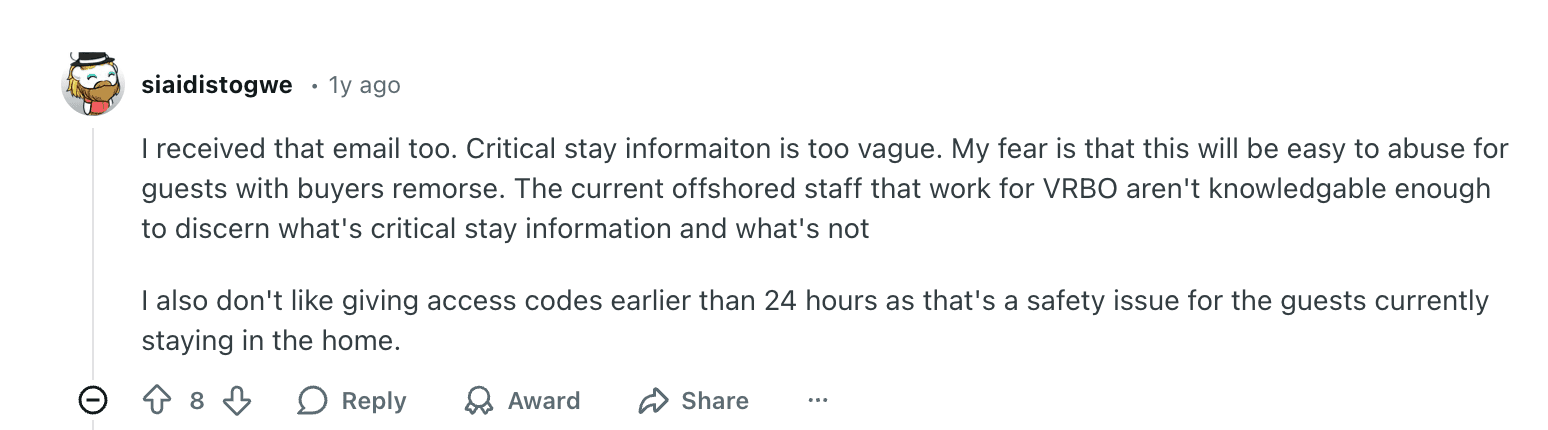
Reddit hosts worry “critical stay information” is vague and could be abused by guests with buyer’s remorse, or misinterpreted by offshore support.
Many fear being held liable when guests ignore messages or go to the wrong address.
A bad review resulting from miscommunication feels harsher now.

Pragmatic Acceptance
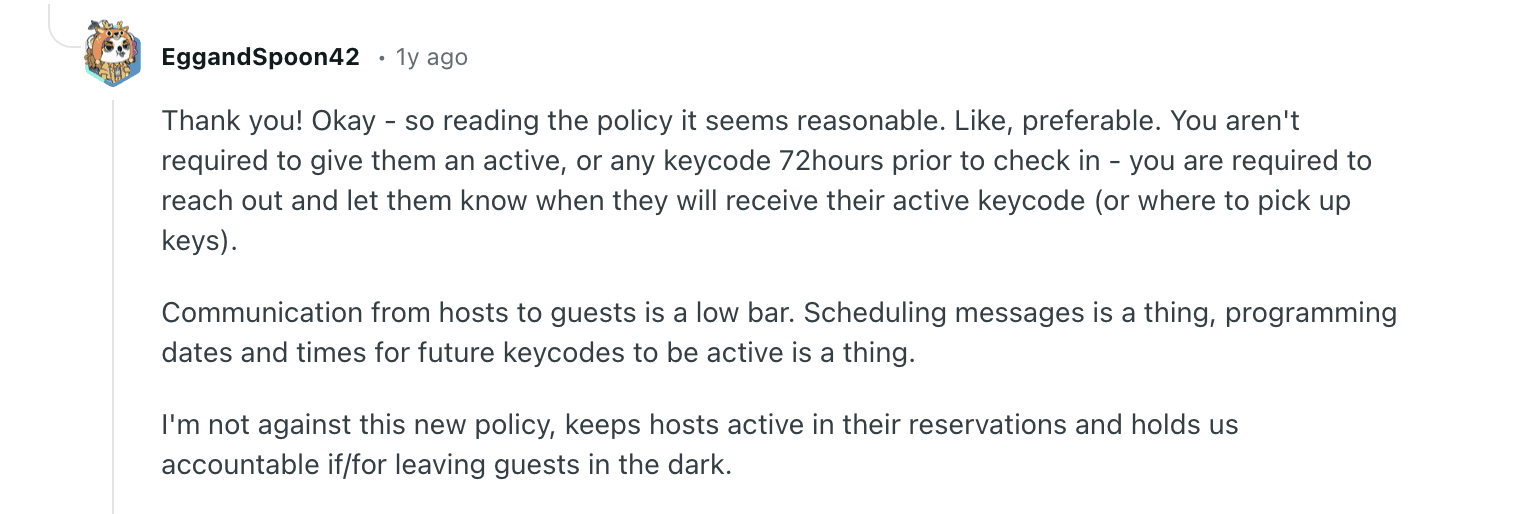
Other hosts say the policy is reasonable, pointing out you only need to confirm when the code arrives, not send the active code days in advance.
Some welcome the crackdown, saying it's a good idea that encourages reliability.
A common view: this will weed out flaky hosts and reward those who operate more like hotels. It pushes hosts to improve SOPs and management services.

Guest perspective: Book with Confidence
Guests, meanwhile, mostly see Vrbo’s Book with Confidence Guarantee, not the fee table.
From their angle:
Confidence in a full refund if something goes wrong
Faster responses from hosts
Fewer last-minute surprises
Clearer own policies, flexible cancellation policies, and better access communication.
So while hosts see a minefield of penalties, guests see a safety net – and that’s exactly how Vrbo is marketing it. This increases guest trust, especially for those who’ve had bad travel experiences on other third party booking platforms.
How to Avoid VRBO Cancellations Caused by Slow Responses
The good news: you can make these policies almost a non-issue with the right systems.
1. Systematize your 72-hour + access messaging
Create a standard template that goes out 4–5 days before arrival:
Confirms their stay
Explains when and how they’ll receive access details
Recaps key info (parking, directions, contact number)
Use Vrbo’s inbox or your guest messaging platform to schedule this automatically.
Ensure you send full access instructions before check-in time, also via scheduled messaging.
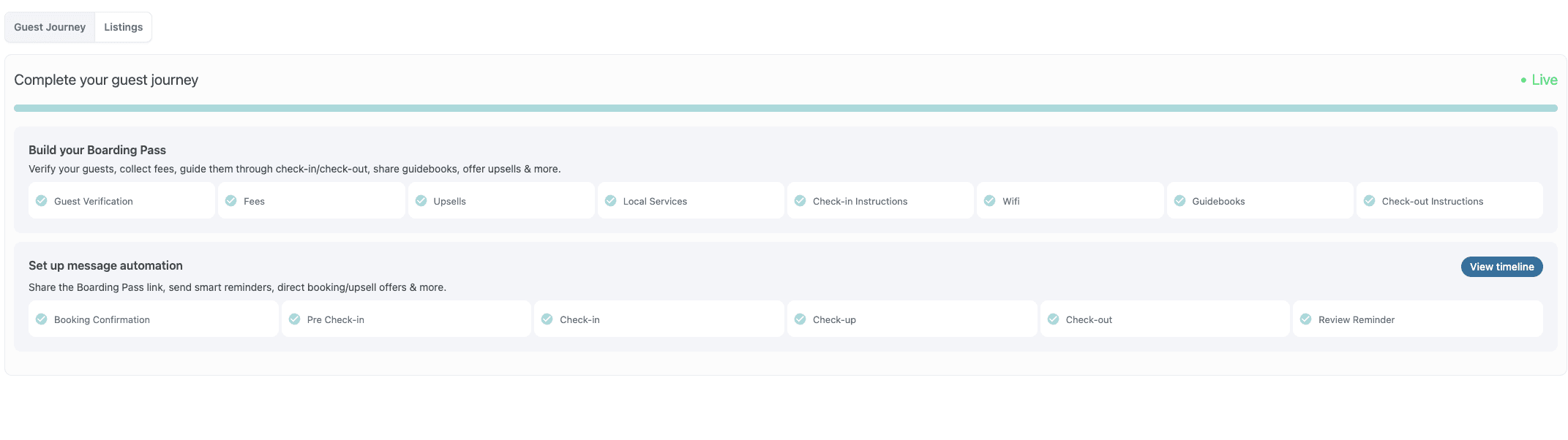
Here's how you can automate messaging for VRBO guests in Enso Connect.Navigate to Listing Group - Guest Journey

Creating a Guest Journey in the Enso Connect platform
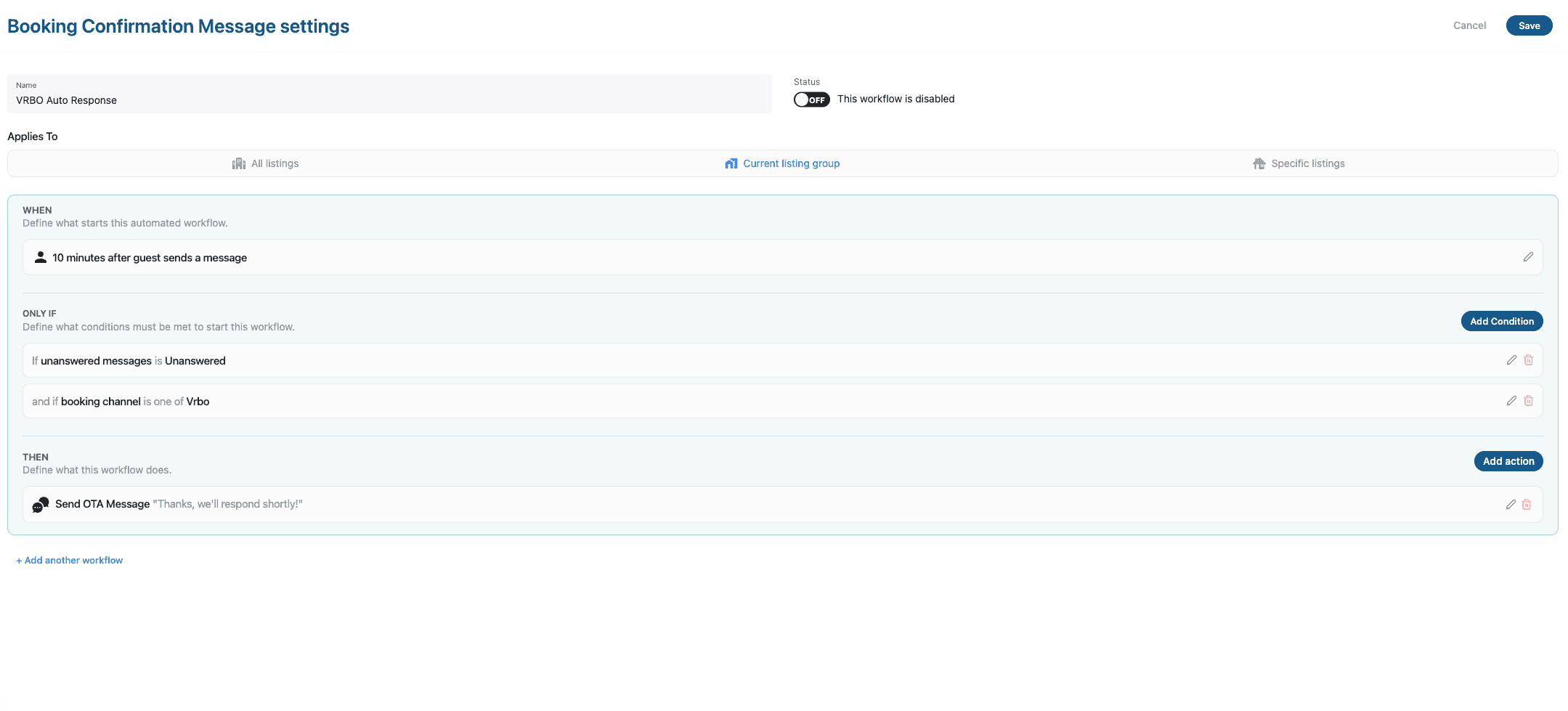
Pick any category (e.g. Booking Confirmation) and hit add workflow. Configure it as such

Creating an auto-response rule in Enso Connect' "If this then that" system.
Result: Vrbo will see a clear message trail if there’s ever a dispute.
2. Treat “critical stay” questions like a one-hour SLA
Mentally reframe “critical stay” questions as having a service-level agreement:
Aim to respond within minutes, not just within the allowed 1/12/24 hours.
Turn on push notifications for the Vrbo app and your connected unified inbox.
Use saved replies for common critical issues (Wi-Fi outage, lock not working, power cut), but always personalize the message and outline the resolution or ETA.
The answer should look like: “We’re looking into it, will update you by X time”.
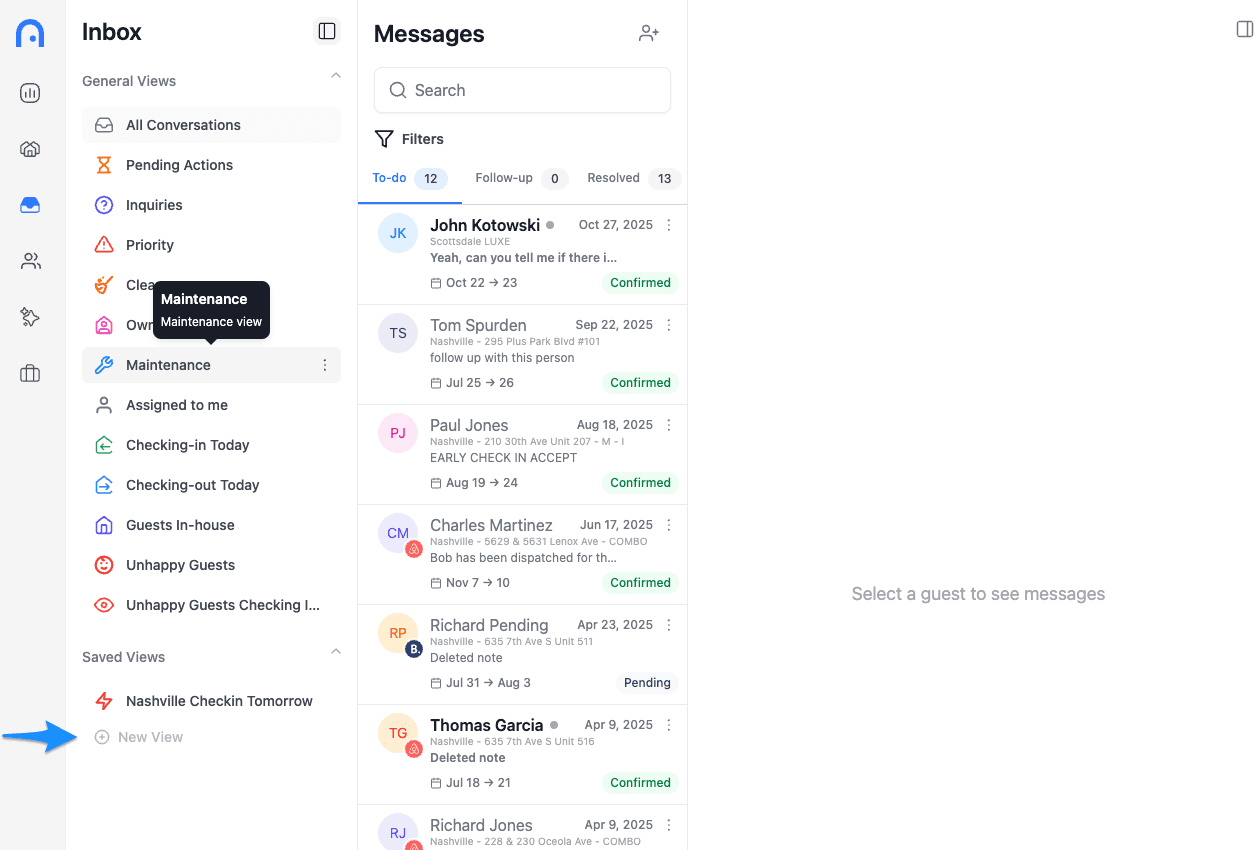
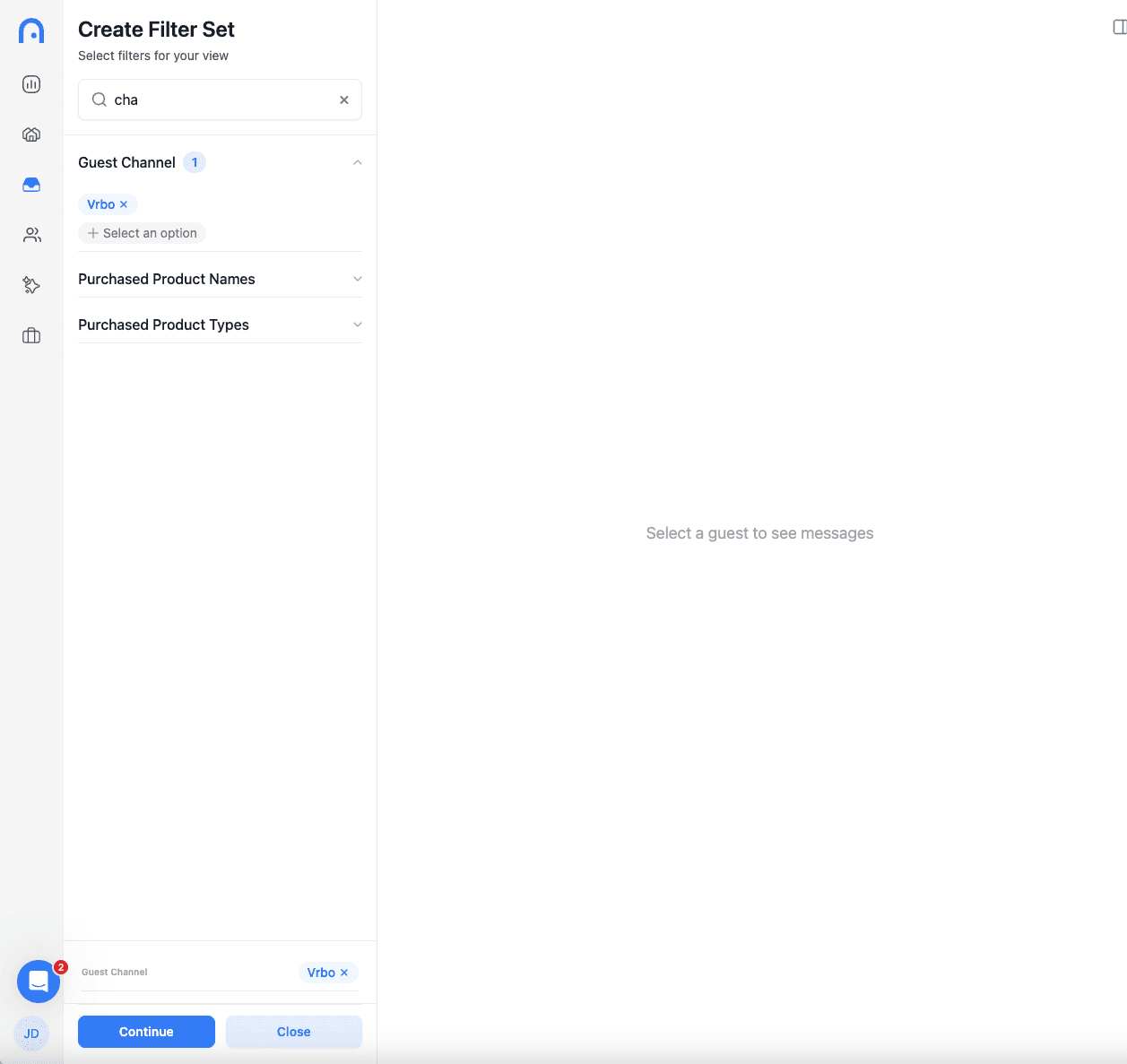
Here's how you can prioritize VRBO messages in Enso Connect's unified inbox to never miss a guest request coming from VRBO.
Create a New View in Enso Connect's Inbox

Select Guest Channel → VRBO

3. Build redundancy into your availability
Don’t be a single point of failure.
Add a co-host or backup contact who can:
See messages
Trigger local help (cleaners, maintenance, key drop)
For property managers, create an on-call rota so someone is always watching messages during local 8:00–21:00.
Provide guests with an emergency phone number in addition to in-app messaging for true access/safety issues.
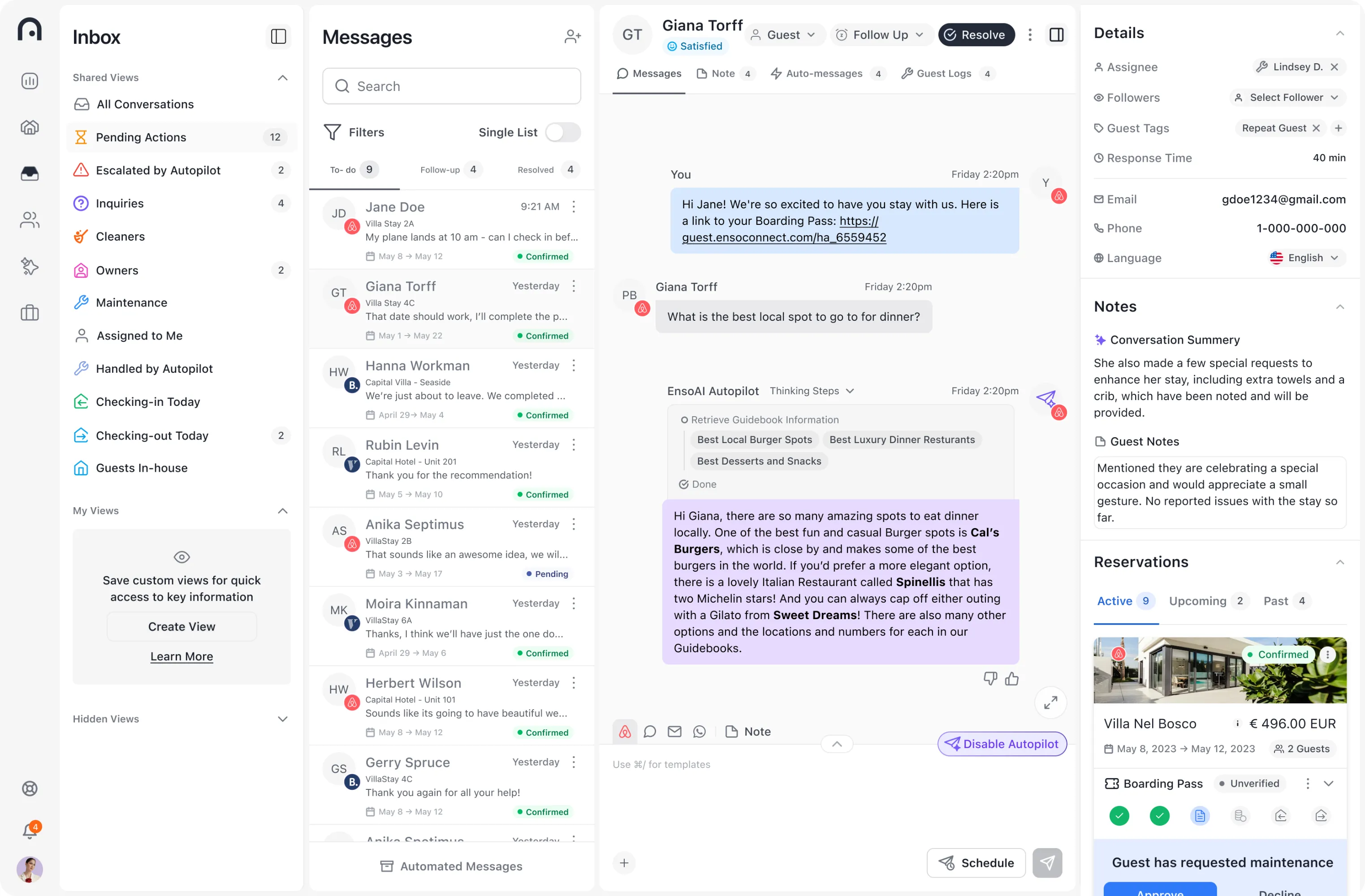
If you're using Enso Connect’s AutoPilot, you can configure your AI agents to handle “critical stay” questions within your guardrails whenever you’re not available.
If Vrbo calls and you’re unavailable, someone else should be able to pick up.
4. Align your tech with the policy
Use smart locks or code systems where you can:
Pre-program codes to activate at check-in time, even if you send the code days before.
Centralize communication with a unified inbox so Vrbo messages don’t get buried under Airbnb, Booking or other messages.
If you use AI or automated messaging, configure it to:
Immediately acknowledge the issue
Escalate critical topics to a human if needed.
5. Document everything
If you ever need a cancellation waiver, you have 10 days to request it and prove the issue was outside your control (force majeure, safety emergency, guest breaking rules, etc.).
Make sure you can pull:
Message history showing you met the 72-hour and response-time rules
Photos or logs if the issue was on the guest side (wrong address, refused rules, etc.)
Good documentation is your best protection against unfairly treated cases.
The Big Mindset Shift: Responsiveness as Risk Management
The October 2025 update made something very clear:
On Vrbo, communication is no longer just a guest-experience metric – it’s a financial risk lever.
Slow or missing replies can now trigger:
Booking cancellation
Full guest refund
Up to 100% of the reservation value charged as a fee
Lost payout, suspensions, ranking drops, and Premier Host impacts
Flip side: if you nail communications:
Guests feel safe and supported
You’re protected against access-related claims
You signal to Vrbo that you’re the kind of host they want to send more bookings to
So yes, fast, thoughtful responses signal great service.
But in late 2025 and beyond, they’re also how you keep Vrbo from turning a booking into a 100% cancellation fee.
Run your messaging like a professional service, and these new policies become a competitive advantage instead of a landmine.
Slow replies on Vrbo used to “just” be bad service.
As of October 1, 2025, the VRBO Host-Initiated Cancellation Policy turned slow communication into something far more serious:
A potential 100% penalty on the booking amount — even if the guest’s reservation was otherwise solid.
This update means hosts must understand how the response time rules, communication expectations, and check-in procedures all tie directly into Vrbo’s cancellation policy and ranking metrics.
This article explains:
The new rules and the risks for every property owner, manager, or vacation rental professional
What Vrbo expects at the time of booking, before and right at check-in, and during stay
How the rules impact vacation rental, short-term rental, and VRBO listing performance
What both hosts and potential guests think about the change
Best practices to avoid cancellations, protect rental income, and maintain guest trust and platform reputation
Here’s how the new Vrbo Host-Initiated Cancellation Policy ties directly into the Host Communications Policy – and why answering check-in and access questions fast is now both good hospitality and legal compliance.
The New Risk: Slow Responses Can Trigger 100% Penalties
Vrbo’s October 2025 update introduced fee tiers for partner-initiated cancellations. Under the following circumstances, a cancellation caused by access issues, missing check-in instructions, or host unresponsiveness can result in Vrbo keeping up to 100% of the booking amount.
In 2025 Vrbo rolled out two big pieces of policy:
Host Communications Policy (effective Jan 1, 2025) – sets strict deadlines for:
Sending check-in instructions and access info
Answering “critical stay information” questions (access, safety, key amenities, etc.
Host-Initiated Cancellation Policy (updated Oct 1, 2025) – adds tiered financial penalties when a reservation is cancelled or when a host is “responsible” for a cancellation, including non-responsiveness and denied entry.
The core change in October:
If a guest can’t access the property and Vrbo can’t reach you in time, it’s now treated as a host-initiated cancellation with up to 100% of the reservation value charged as a fee.
This includes situations where:
A guest arrives within the expected hours of arrival and cannot enter
The host fails to send necessary information (codes, directions, house rules)
Vrbo cannot reach the host by phone call or message
Issues arise that are within the host’s control and are not solved in time
If the host is unreachable, Vrbo can:
Cancel the booking
Issue a full refund to the guest
Apply payout deductions equal to 10–100% of the reservation
Potentially impose a temporary suspension or reduced visibility in search results on the platform
Fee tiers (US, USD listings):
10% of reservation value – cancelled >30 days before check-in
25% – cancelled 2–30 days before check-in
50% – cancelled within 48 hours of check-in or after, including non-responsiveness that violates the Communications Policy
100% – starting Oct 1, 2025, if:
The reservation is cancelled at check-in time or after.
The stay is “passively not honoured” due to non-responsiveness under the Host Communications Policy, or
The guest is denied entry without justifiable cause.
On top of the fee:
You don’t receive the payout for that reservation.
If you’d already been paid, future payouts are reduced until Vrbo recovers the amount.
Vrbo can also impose a 7-day listing suspension, blocked calendars, and harm to your Premier Host eligibility and ranking.
Once Vrbo processes a cancellation request, the system reviews the Vrbo dashboard, message history, and reservation manager logs to determine responsibility.
This is why Vrbo’s response time rules are now effectively a host survival guide.
Communication = Compliance: The Timeframes You Must Hit
Check-in & access info
Under the Host Communications Policy:
At least 72 hours before scheduled check-in
You must tell guests when and how they’ll receive full access instructions.e.g. “You’ll receive your door code via the Vrbo app at 9 AM on the day of arrival.”
Before check-in time
You must provide the full access instructions (door code, key pick-up details, etc.).
If a guest tells Vrbo within 72 hours of check-in that they don’t have check-in/access info, Vrbo can:
Investigate
Try to reach you
If they can’t confirm you complied and they can’t reach you in time, cancel the booking, refund the guest, and apply the Host-Initiated Cancellation Policy.
Response times for “critical stay information”
“Critical stay information” covers things a guest needs to safely complete the stay: access, health and safety, outages, location, accessibility, key amenities etc.
You must respond to these questions within:
5+ days before stay – within 24 hours
1-4 days before stay – within 12 hours
Check-in day & during stay (8:00–21:00 property time zone) – within 1 hour. For out-of-hours queries, hosts must respond by 9 am the following day.
And not just with “Got it”:
You must resolve the specific issue or tell them when it will be resolved.
An automatic reply does not count.
If Vrbo becomes aware that you didn’t respond in time to critical questions and can’t fix it with you, they may:
Cancel the booking,
Refund the guest, and
Trigger cancellation fees + ranking hits under the Host-Initiated Cancellation Policy.
In other words:
Failing to answer critical questions on time is now treated like cancelling the guest.
What This Means in Practice for Vacation Rentals Using VRBO
For individual hosts
If you’re a solo host with a day job, kids, flights, etc., the bar just got higher:
You must plan and schedule your check-in communications (72+ hours and access before arrival).
On check-in day, you’re expected to be effectively “on call” between 8 AM and 9 PM for critical issues.
If your phone dies, you miss notifications, or you’re on a plane and unreachable, and the guest can’t get in, Vrbo can still classify that as a host-initiated cancellation with up to 100% fee.
This is why so many small hosts are calling the new policy “punitive” and worrying about edge cases like guests who don’t read messages or support agents misjudging what’s “critical.”
For property managers
Professional managers have more tools and staff, but much more volume and risk:
A single missed access message across 100+ units can mean tens of thousands of dollars at risk via 50–100% cancellation fees.
Professional Property Managers get invoices for fees and can face multiple suspensions or calendar blocks if problems repeat.
Operational discipline (SOPs, 24/7 coverage, automation) is no longer a “nice-to-have”; it’s the cost of playing on Vrbo.
How Hosts and Guests Are Reacting
Hosts Split: Too Harsh or Necessary?
Industry analysis and community threads show hosts are split:
Frustration & Anxiety
Property managers see the fees and suspensions as “more risk, more responsibility” pushed onto hosts.
Reddit hosts worry “critical stay information” is vague and could be abused by guests with buyer’s remorse, or misinterpreted by offshore support.
Many fear being held liable when guests ignore messages or go to the wrong address.
A bad review resulting from miscommunication feels harsher now.

Pragmatic Acceptance
Other hosts say the policy is reasonable, pointing out you only need to confirm when the code arrives, not send the active code days in advance.
Some welcome the crackdown, saying it's a good idea that encourages reliability.
A common view: this will weed out flaky hosts and reward those who operate more like hotels. It pushes hosts to improve SOPs and management services.

Guest perspective: Book with Confidence
Guests, meanwhile, mostly see Vrbo’s Book with Confidence Guarantee, not the fee table.
From their angle:
Confidence in a full refund if something goes wrong
Faster responses from hosts
Fewer last-minute surprises
Clearer own policies, flexible cancellation policies, and better access communication.
So while hosts see a minefield of penalties, guests see a safety net – and that’s exactly how Vrbo is marketing it. This increases guest trust, especially for those who’ve had bad travel experiences on other third party booking platforms.
How to Avoid VRBO Cancellations Caused by Slow Responses
The good news: you can make these policies almost a non-issue with the right systems.
1. Systematize your 72-hour + access messaging
Create a standard template that goes out 4–5 days before arrival:
Confirms their stay
Explains when and how they’ll receive access details
Recaps key info (parking, directions, contact number)
Use Vrbo’s inbox or your guest messaging platform to schedule this automatically.
Ensure you send full access instructions before check-in time, also via scheduled messaging.
Here's how you can automate messaging for VRBO guests in Enso Connect.Navigate to Listing Group - Guest Journey

Creating a Guest Journey in the Enso Connect platform
Pick any category (e.g. Booking Confirmation) and hit add workflow. Configure it as such

Creating an auto-response rule in Enso Connect' "If this then that" system.
Result: Vrbo will see a clear message trail if there’s ever a dispute.
2. Treat “critical stay” questions like a one-hour SLA
Mentally reframe “critical stay” questions as having a service-level agreement:
Aim to respond within minutes, not just within the allowed 1/12/24 hours.
Turn on push notifications for the Vrbo app and your connected unified inbox.
Use saved replies for common critical issues (Wi-Fi outage, lock not working, power cut), but always personalize the message and outline the resolution or ETA.
The answer should look like: “We’re looking into it, will update you by X time”.
Here's how you can prioritize VRBO messages in Enso Connect's unified inbox to never miss a guest request coming from VRBO.
Create a New View in Enso Connect's Inbox

Select Guest Channel → VRBO

3. Build redundancy into your availability
Don’t be a single point of failure.
Add a co-host or backup contact who can:
See messages
Trigger local help (cleaners, maintenance, key drop)
For property managers, create an on-call rota so someone is always watching messages during local 8:00–21:00.
Provide guests with an emergency phone number in addition to in-app messaging for true access/safety issues.
If you're using Enso Connect’s AutoPilot, you can configure your AI agents to handle “critical stay” questions within your guardrails whenever you’re not available.
If Vrbo calls and you’re unavailable, someone else should be able to pick up.
4. Align your tech with the policy
Use smart locks or code systems where you can:
Pre-program codes to activate at check-in time, even if you send the code days before.
Centralize communication with a unified inbox so Vrbo messages don’t get buried under Airbnb, Booking or other messages.
If you use AI or automated messaging, configure it to:
Immediately acknowledge the issue
Escalate critical topics to a human if needed.
5. Document everything
If you ever need a cancellation waiver, you have 10 days to request it and prove the issue was outside your control (force majeure, safety emergency, guest breaking rules, etc.).
Make sure you can pull:
Message history showing you met the 72-hour and response-time rules
Photos or logs if the issue was on the guest side (wrong address, refused rules, etc.)
Good documentation is your best protection against unfairly treated cases.
The Big Mindset Shift: Responsiveness as Risk Management
The October 2025 update made something very clear:
On Vrbo, communication is no longer just a guest-experience metric – it’s a financial risk lever.
Slow or missing replies can now trigger:
Booking cancellation
Full guest refund
Up to 100% of the reservation value charged as a fee
Lost payout, suspensions, ranking drops, and Premier Host impacts
Flip side: if you nail communications:
Guests feel safe and supported
You’re protected against access-related claims
You signal to Vrbo that you’re the kind of host they want to send more bookings to
So yes, fast, thoughtful responses signal great service.
But in late 2025 and beyond, they’re also how you keep Vrbo from turning a booking into a 100% cancellation fee.
Run your messaging like a professional service, and these new policies become a competitive advantage instead of a landmine.
Slow replies on Vrbo used to “just” be bad service.
As of October 1, 2025, the VRBO Host-Initiated Cancellation Policy turned slow communication into something far more serious:
A potential 100% penalty on the booking amount — even if the guest’s reservation was otherwise solid.
This update means hosts must understand how the response time rules, communication expectations, and check-in procedures all tie directly into Vrbo’s cancellation policy and ranking metrics.
This article explains:
The new rules and the risks for every property owner, manager, or vacation rental professional
What Vrbo expects at the time of booking, before and right at check-in, and during stay
How the rules impact vacation rental, short-term rental, and VRBO listing performance
What both hosts and potential guests think about the change
Best practices to avoid cancellations, protect rental income, and maintain guest trust and platform reputation
Here’s how the new Vrbo Host-Initiated Cancellation Policy ties directly into the Host Communications Policy – and why answering check-in and access questions fast is now both good hospitality and legal compliance.
The New Risk: Slow Responses Can Trigger 100% Penalties
Vrbo’s October 2025 update introduced fee tiers for partner-initiated cancellations. Under the following circumstances, a cancellation caused by access issues, missing check-in instructions, or host unresponsiveness can result in Vrbo keeping up to 100% of the booking amount.
In 2025 Vrbo rolled out two big pieces of policy:
Host Communications Policy (effective Jan 1, 2025) – sets strict deadlines for:
Sending check-in instructions and access info
Answering “critical stay information” questions (access, safety, key amenities, etc.
Host-Initiated Cancellation Policy (updated Oct 1, 2025) – adds tiered financial penalties when a reservation is cancelled or when a host is “responsible” for a cancellation, including non-responsiveness and denied entry.
The core change in October:
If a guest can’t access the property and Vrbo can’t reach you in time, it’s now treated as a host-initiated cancellation with up to 100% of the reservation value charged as a fee.
This includes situations where:
A guest arrives within the expected hours of arrival and cannot enter
The host fails to send necessary information (codes, directions, house rules)
Vrbo cannot reach the host by phone call or message
Issues arise that are within the host’s control and are not solved in time
If the host is unreachable, Vrbo can:
Cancel the booking
Issue a full refund to the guest
Apply payout deductions equal to 10–100% of the reservation
Potentially impose a temporary suspension or reduced visibility in search results on the platform
Fee tiers (US, USD listings):
10% of reservation value – cancelled >30 days before check-in
25% – cancelled 2–30 days before check-in
50% – cancelled within 48 hours of check-in or after, including non-responsiveness that violates the Communications Policy
100% – starting Oct 1, 2025, if:
The reservation is cancelled at check-in time or after.
The stay is “passively not honoured” due to non-responsiveness under the Host Communications Policy, or
The guest is denied entry without justifiable cause.
On top of the fee:
You don’t receive the payout for that reservation.
If you’d already been paid, future payouts are reduced until Vrbo recovers the amount.
Vrbo can also impose a 7-day listing suspension, blocked calendars, and harm to your Premier Host eligibility and ranking.
Once Vrbo processes a cancellation request, the system reviews the Vrbo dashboard, message history, and reservation manager logs to determine responsibility.
This is why Vrbo’s response time rules are now effectively a host survival guide.
Communication = Compliance: The Timeframes You Must Hit
Check-in & access info
Under the Host Communications Policy:
At least 72 hours before scheduled check-in
You must tell guests when and how they’ll receive full access instructions.e.g. “You’ll receive your door code via the Vrbo app at 9 AM on the day of arrival.”
Before check-in time
You must provide the full access instructions (door code, key pick-up details, etc.).
If a guest tells Vrbo within 72 hours of check-in that they don’t have check-in/access info, Vrbo can:
Investigate
Try to reach you
If they can’t confirm you complied and they can’t reach you in time, cancel the booking, refund the guest, and apply the Host-Initiated Cancellation Policy.
Response times for “critical stay information”
“Critical stay information” covers things a guest needs to safely complete the stay: access, health and safety, outages, location, accessibility, key amenities etc.
You must respond to these questions within:
5+ days before stay – within 24 hours
1-4 days before stay – within 12 hours
Check-in day & during stay (8:00–21:00 property time zone) – within 1 hour. For out-of-hours queries, hosts must respond by 9 am the following day.
And not just with “Got it”:
You must resolve the specific issue or tell them when it will be resolved.
An automatic reply does not count.
If Vrbo becomes aware that you didn’t respond in time to critical questions and can’t fix it with you, they may:
Cancel the booking,
Refund the guest, and
Trigger cancellation fees + ranking hits under the Host-Initiated Cancellation Policy.
In other words:
Failing to answer critical questions on time is now treated like cancelling the guest.
What This Means in Practice for Vacation Rentals Using VRBO
For individual hosts
If you’re a solo host with a day job, kids, flights, etc., the bar just got higher:
You must plan and schedule your check-in communications (72+ hours and access before arrival).
On check-in day, you’re expected to be effectively “on call” between 8 AM and 9 PM for critical issues.
If your phone dies, you miss notifications, or you’re on a plane and unreachable, and the guest can’t get in, Vrbo can still classify that as a host-initiated cancellation with up to 100% fee.
This is why so many small hosts are calling the new policy “punitive” and worrying about edge cases like guests who don’t read messages or support agents misjudging what’s “critical.”
For property managers
Professional managers have more tools and staff, but much more volume and risk:
A single missed access message across 100+ units can mean tens of thousands of dollars at risk via 50–100% cancellation fees.
Professional Property Managers get invoices for fees and can face multiple suspensions or calendar blocks if problems repeat.
Operational discipline (SOPs, 24/7 coverage, automation) is no longer a “nice-to-have”; it’s the cost of playing on Vrbo.
How Hosts and Guests Are Reacting
Hosts Split: Too Harsh or Necessary?
Industry analysis and community threads show hosts are split:
Frustration & Anxiety
Property managers see the fees and suspensions as “more risk, more responsibility” pushed onto hosts.
Reddit hosts worry “critical stay information” is vague and could be abused by guests with buyer’s remorse, or misinterpreted by offshore support.
Many fear being held liable when guests ignore messages or go to the wrong address.
A bad review resulting from miscommunication feels harsher now.

Pragmatic Acceptance
Other hosts say the policy is reasonable, pointing out you only need to confirm when the code arrives, not send the active code days in advance.
Some welcome the crackdown, saying it's a good idea that encourages reliability.
A common view: this will weed out flaky hosts and reward those who operate more like hotels. It pushes hosts to improve SOPs and management services.

Guest perspective: Book with Confidence
Guests, meanwhile, mostly see Vrbo’s Book with Confidence Guarantee, not the fee table.
From their angle:
Confidence in a full refund if something goes wrong
Faster responses from hosts
Fewer last-minute surprises
Clearer own policies, flexible cancellation policies, and better access communication.
So while hosts see a minefield of penalties, guests see a safety net – and that’s exactly how Vrbo is marketing it. This increases guest trust, especially for those who’ve had bad travel experiences on other third party booking platforms.
How to Avoid VRBO Cancellations Caused by Slow Responses
The good news: you can make these policies almost a non-issue with the right systems.
1. Systematize your 72-hour + access messaging
Create a standard template that goes out 4–5 days before arrival:
Confirms their stay
Explains when and how they’ll receive access details
Recaps key info (parking, directions, contact number)
Use Vrbo’s inbox or your guest messaging platform to schedule this automatically.
Ensure you send full access instructions before check-in time, also via scheduled messaging.
Here's how you can automate messaging for VRBO guests in Enso Connect.Navigate to Listing Group - Guest Journey

Creating a Guest Journey in the Enso Connect platform
Pick any category (e.g. Booking Confirmation) and hit add workflow. Configure it as such

Creating an auto-response rule in Enso Connect' "If this then that" system.
Result: Vrbo will see a clear message trail if there’s ever a dispute.
2. Treat “critical stay” questions like a one-hour SLA
Mentally reframe “critical stay” questions as having a service-level agreement:
Aim to respond within minutes, not just within the allowed 1/12/24 hours.
Turn on push notifications for the Vrbo app and your connected unified inbox.
Use saved replies for common critical issues (Wi-Fi outage, lock not working, power cut), but always personalize the message and outline the resolution or ETA.
The answer should look like: “We’re looking into it, will update you by X time”.
Here's how you can prioritize VRBO messages in Enso Connect's unified inbox to never miss a guest request coming from VRBO.
Create a New View in Enso Connect's Inbox

Select Guest Channel → VRBO

3. Build redundancy into your availability
Don’t be a single point of failure.
Add a co-host or backup contact who can:
See messages
Trigger local help (cleaners, maintenance, key drop)
For property managers, create an on-call rota so someone is always watching messages during local 8:00–21:00.
Provide guests with an emergency phone number in addition to in-app messaging for true access/safety issues.
If you're using Enso Connect’s AutoPilot, you can configure your AI agents to handle “critical stay” questions within your guardrails whenever you’re not available.
If Vrbo calls and you’re unavailable, someone else should be able to pick up.
4. Align your tech with the policy
Use smart locks or code systems where you can:
Pre-program codes to activate at check-in time, even if you send the code days before.
Centralize communication with a unified inbox so Vrbo messages don’t get buried under Airbnb, Booking or other messages.
If you use AI or automated messaging, configure it to:
Immediately acknowledge the issue
Escalate critical topics to a human if needed.
5. Document everything
If you ever need a cancellation waiver, you have 10 days to request it and prove the issue was outside your control (force majeure, safety emergency, guest breaking rules, etc.).
Make sure you can pull:
Message history showing you met the 72-hour and response-time rules
Photos or logs if the issue was on the guest side (wrong address, refused rules, etc.)
Good documentation is your best protection against unfairly treated cases.
The Big Mindset Shift: Responsiveness as Risk Management
The October 2025 update made something very clear:
On Vrbo, communication is no longer just a guest-experience metric – it’s a financial risk lever.
Slow or missing replies can now trigger:
Booking cancellation
Full guest refund
Up to 100% of the reservation value charged as a fee
Lost payout, suspensions, ranking drops, and Premier Host impacts
Flip side: if you nail communications:
Guests feel safe and supported
You’re protected against access-related claims
You signal to Vrbo that you’re the kind of host they want to send more bookings to
So yes, fast, thoughtful responses signal great service.
But in late 2025 and beyond, they’re also how you keep Vrbo from turning a booking into a 100% cancellation fee.
Run your messaging like a professional service, and these new policies become a competitive advantage instead of a landmine.
Table des Matières
Titre
Ressources pour développer votre entreprise
Découvrez des perspectives d’experts, des conseils et des histoires de réussite concrètes
Ressources pour développer votre entreprise
Découvrez des perspectives d’experts, des conseils et des histoires de réussite concrètes
Ressources pour développer votre entreprise
Découvrez des perspectives d’experts, des conseils et des histoires de réussite concrètes
Reconnus comme des leaders du secteur


Bureau canadien
488 Wellington Street West
Toronto, ON Canada
Bureau espagnol
Luxa, Glories, Carrer de Tànger
86, 08018 Barcelona, Spain
2025 Enso Connect ™ Tous droits réservés.
Reconnus comme des leaders du secteur


Bureau canadien
488 Wellington Street West
Toronto, ON Canada
Bureau espagnol
Luxa, Glories, Carrer de Tànger
86, 08018 Barcelona, Spain
2025 Enso Connect ™ Tous droits réservés.
Reconnus comme des leaders du secteur


Bureau canadien
488 Wellington Street West
Toronto, ON Canada
Bureau espagnol
Luxa, Glories, Carrer de Tànger
86, 08018 Barcelona, Spain
2025 Enso Connect ™ Tous droits réservés.